TL;DR
I used Cloudflare as the control plane — not just a CDN — to:
- Secure origins without exposing IPs
- Enforce redirects and access logic at the edge
- Migrate a live, user-facing domain safely
- Avoid common pitfalls like double TLS termination and broken redirects
This post walks through architecture, request flow, failures, and fixes.
Architecture Overview
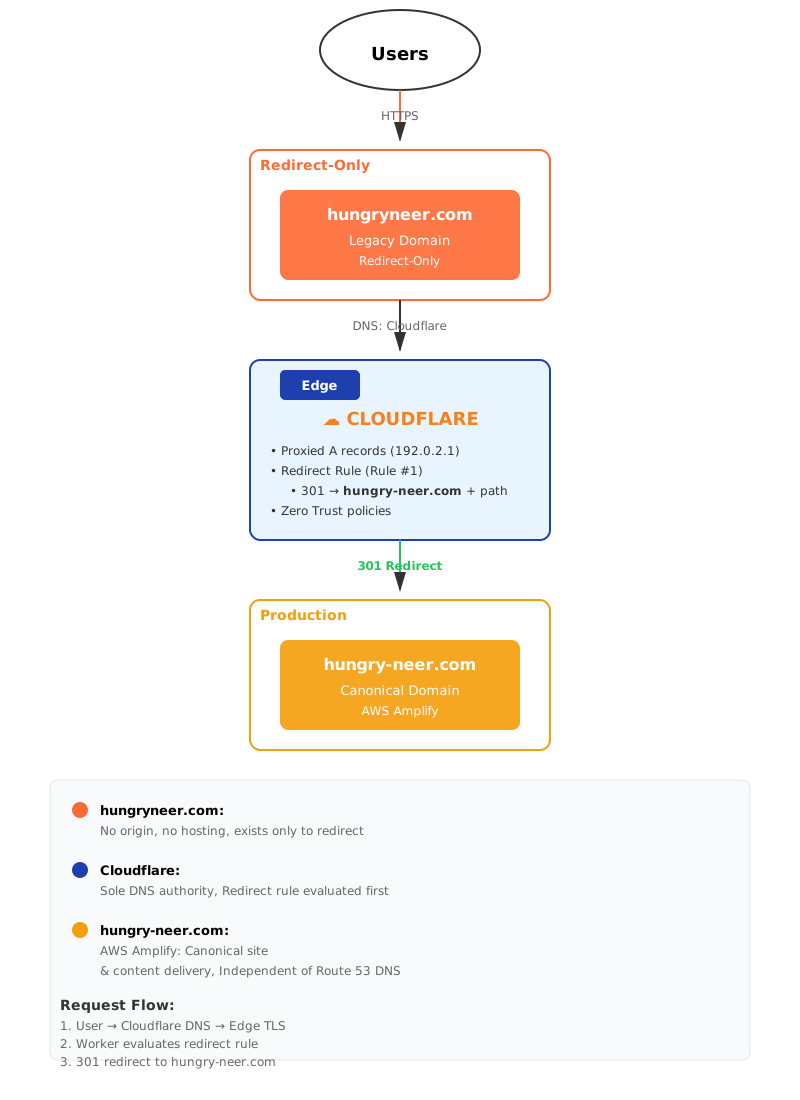
Key domains: - hungryneer.com → legacy, redirect-only - hungry-neer.com → canonical production site
Key principle: Cloudflare is authoritative for DNS, TLS, and edge logic. Origins are never directly exposed.
DNS on Cloudflare
I deliberately moved DNS authority to Cloudflare and treated it as a traffic control layer.
Orange cloud vs DNS-only (critical decision)
Orange cloud (proxied): - Redirect-only domains - Domains with Workers or edge logic - When origin should never be hit
DNS-only: - DNS validation records (ACM) - Third-party SaaS ownership checks - Non-HTTP services - APIs requiring raw client IPs
Understanding when to use DNS-only mode versus proxied mode is crucial for proper Cloudflare configuration.
Subdomain Isolation Strategy
| Domain | Purpose | Origin |
|---|---|---|
| hungryneer.com | Redirect-only | None |
| hungry-neer.com | Production | AWS Amplify |
This prevented: - Redirect loops - TLS confusion - Accidental proxying of CloudFront behind Cloudflare
Cloudflare Workers (Edge Logic)
I implemented redirect logic using Cloudflare Workers, ensuring redirects happen before any origin is contacted.
export default {
  fetch(request) {
    const url = new URL(request.url);
    return Response.redirect(
      `https://hungry-neer.com${url.pathname}${url.search}`,
      301
    );
  }
};
Why Workers?
- Global, instant behavior
- Zero origin load
- Deterministic redirects
- Easy to extend with auth, geo, or bot logic
Cloudflare Tunnel (Outbound-Only Access)
For private services and experiments, I used Cloudflare Tunnel to:
- Eliminate inbound firewall rules
- Avoid exposing origin IPs
- Ensure all traffic is brokered by Cloudflare
Origins initiate outbound connections only — a clean Zero Trust posture.
Zero Trust at the Edge
Authentication and authorization occur at the edge, not at the origin.
Examples: - Browser-only access - Blocking curl / empty User-Agent requests - Identity-based access for admin paths
Key takeaway: The origin never sees unauthenticated traffic.
TLS Termination Strategy
- TLS terminates at Cloudflare
- Cloudflare → origin uses managed HTTPS where required
- Avoided double TLS termination
- Avoided 525 / 526 errors during migration
Request Flow
Canonical flow ``` Browser → Cloudflare DNS → Edge TLS termination → Worker logic (redirect/auth) → Amplify (CloudFront + S3) → Response via Cloudflare ```
Legacy domain flow ``` Browser → Cloudflare DNS → Worker → 301 redirect → hungry-neer.com ```
Problems I Solved (and How)
Redirects not firing **Cause:** DNS still pointed at AWS **Fix:** Orange-clouded records with dummy IP (192.0.2.1)
DNS resolves but curl fails **Cause:** Resolver / IPv4–IPv6 mismatch during propagation **Fix:** Verified via `dig @1.1.1.1`, waited for convergence
Route 53 + Cloudflare overlap **Cause:** Registrar vs DNS authority confusion **Fix:** Route 53 kept as registrar only, Cloudflare authoritative
Live domain already shared with users **Fix:** Permanent 301 redirect — zero downtime, SEO-safe
Debugging Techniques
digandnslookupagainst specific resolverscurl -Ifor redirects and TLS- Chrome DevTools (provisional headers, cache)
- Cloudflare analytics and cache purge
Why This Architecture Works
Origins are hidden: No direct IP exposure, all traffic flows through Cloudflare
Edge logic is deterministic: Redirects and auth happen before compute
Security happens before compute: Zero Trust policies evaluated at the edge
Failures are observable and debuggable: Cloudflare analytics, logs, and trace tools
The Cost Savings: $100s Saved by Moving Firewall to Cloudflare
One of the unexpected benefits of this architecture was the significant cost reduction.
Before: AWS WAF on Amplify
AWS WAF pricing: - $5/month per Web ACL - $1/month per rule - $0.60 per million requests
For a personal site with moderate traffic (~500K requests/month), this added up to: - Web ACL: $5/month - 5 basic rules (bot protection, rate limiting, geo-blocking, SQL injection, XSS): $5/month - Request charges: $0.30/month - Total: ~$10.30/month or $123.60/year
After: Cloudflare Free Tier
Cloudflare Free includes: - Unlimited DDoS protection - Web Application Firewall (WAF) - Bot management (basic) - Rate limiting - SSL/TLS encryption - CDN with unlimited bandwidth - Cost: $0/month
The Math
By moving security to Cloudflare's edge: - Saved: $123.60/year on AWS WAF alone - Bonus savings: Reduced CloudFront data transfer costs (Cloudflare caches more aggressively) - Additional value: Better performance with Cloudflare's global edge network
Why This Works
Cloudflare's business model is different from AWS: - They monetize enterprise features, not basic security - Free tier is genuinely useful for small sites - Edge security is their core competency
For AWS, WAF is an add-on service with per-request pricing. For Cloudflare, it's built into the platform.
When to Use AWS WAF Instead
AWS WAF still makes sense when: - You need deep AWS integration (Lambda@Edge, API Gateway) - You require custom rule logic that Cloudflare doesn't support - You're already heavily invested in AWS ecosystem - You need compliance features specific to AWS WAF
For a personal site or small business, Cloudflare's free tier provides enterprise-grade security at zero cost.
Key Learnings
1. Cloudflare is more than a CDN — it's a programmable edge platform 2. DNS strategy matters — orange cloud vs DNS-only is a critical decision 3. Workers are powerful — global, instant, and easy to reason about 4. Zero Trust at the edge — origins never see unauthenticated traffic 5. Migration can be zero-downtime — with proper planning and 301 redirects
What's Next
I'm exploring: - Cloudflare R2 for static assets - Durable Objects for stateful edge logic - Workers AI for edge inference - More sophisticated Zero Trust policies
If you're building edge architectures or have questions about Cloudflare, reach out. Happy to discuss trade-offs and lessons learned.
💬 Comments (0)
Loading comments...