Why Build Your Own?
I wanted a personal site that was fast, secure, cost-effective, and gave me full control. No WordPress, no heavy frameworks, no monthly hosting fees. Just clean architecture and modern cloud services.
Goals: - Static site generation for speed - Serverless backend for scalability - Zero monthly costs (free tier only) - Full control over data and features - Production-grade security
Architecture Overview
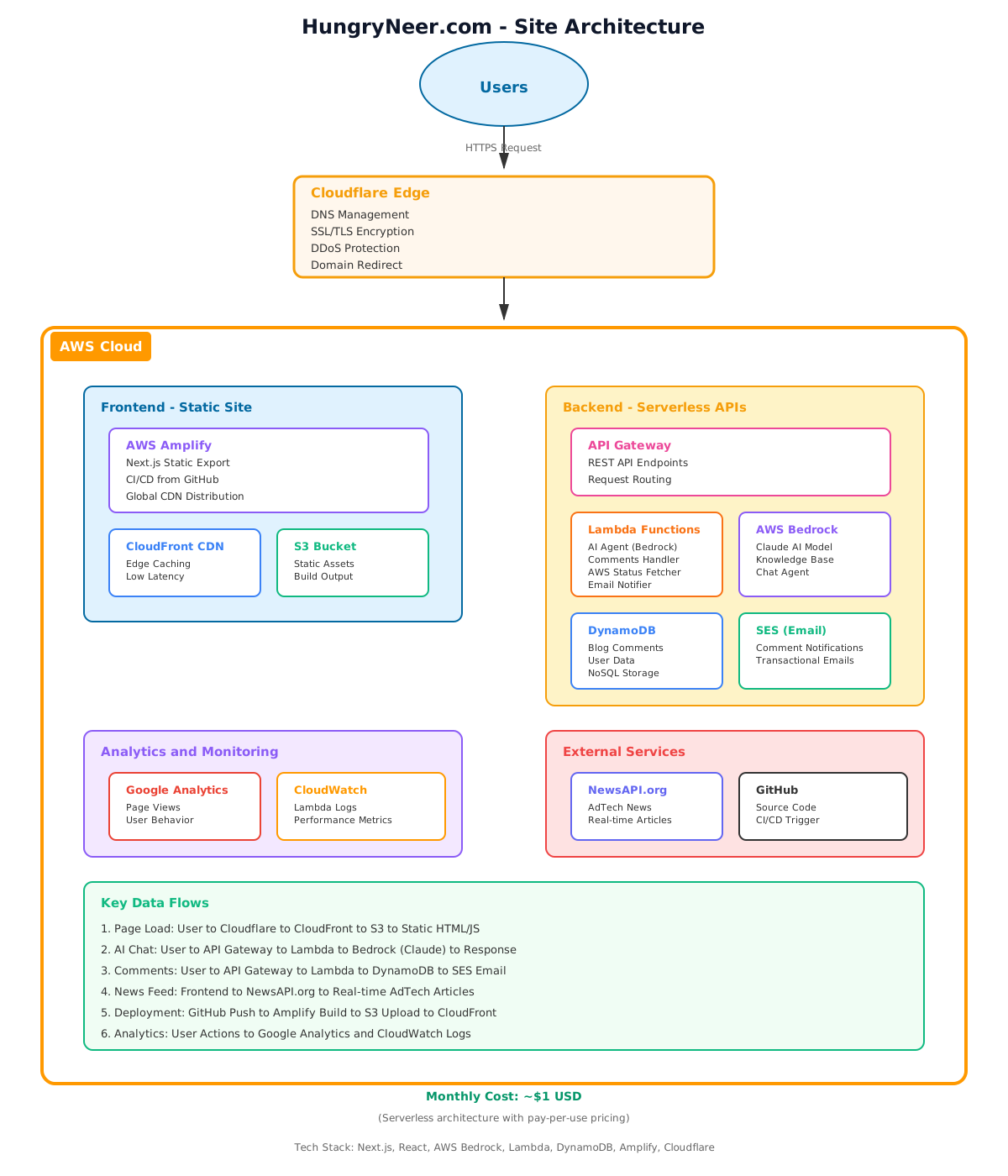
Click to view full size →
Frontend: Next.js Static Export
Why Next.js?
- Static Site Generation (SSG): Pre-renders all pages at build time
- Fast: No server-side rendering overhead
- SEO-friendly: Fully crawlable HTML
- Developer experience: React with file-based routing
Configuration
// next.config.js
module.exports = {
  reactStrictMode: true,
  output: 'export',        // Static HTML export
  trailingSlash: true,     // /blog/post/ instead of /blog/post.html
};
Build Output
npm run build
# Generates static files in /out directory
# Ready to deploy anywhere
Result: Pure HTML/CSS/JS files. No Node.js server required.
Hosting: AWS Amplify
Why Amplify?
- Free tier: 1000 build minutes/month, 15GB storage, 15GB bandwidth
- CI/CD: Auto-deploy on git push
- Custom domains: Free SSL certificates
- Environment variables: Secure config management
Deployment
# Configure build
# amplify.yml handles the build process
# Deploys to CloudFront automatically
`
Cost: $0/month (within free tier)
Backend: Serverless Architecture
API Gateway + Lambda
I built several serverless APIs:
#### 1. AI Chat Agent
// Lambda function using AWS Bedrock
export const handler = async (event) => {
  const { message } = JSON.parse(event.body);

  const response = await bedrockClient.send(
    new InvokeModelCommand({
      modelId: "anthropic.claude-3-sonnet-20240229-v1:0",
      body: JSON.stringify({ messages: [{ role: "user", content: message }] })
    })
  );

  return { statusCode: 200, body: JSON.stringify(response) };
};
Endpoint: GET /agent
#### 2. Contact Form
// Saves submissions to DynamoDB
export const handler = async (event) => {
  const { name, email, message } = JSON.parse(event.body);

  await docClient.send(new PutCommand({
    TableName: "contact-submissions",
    Item: { id: uuid(), name, email, message, timestamp: Date.now() }
  }));

  return { statusCode: 200, body: "Submitted" };
};
Endpoint: POST /contact
#### 3. Blog Comments System
// GET: Fetch approved comments
// POST: Submit new comment (requires moderation)
export const handler = async (event) => {
  if (event.requestContext.http.method === "GET") {
    const comments = await docClient.send(new QueryCommand({
      TableName: "blog-comments",
      KeyConditionExpression: "slug = :slug",
      FilterExpression: "approved = :approved"
    }));
    return { statusCode: 200, body: JSON.stringify(comments) };
  }
  // POST logic...
};
Endpoints: GET /comments, POST /comments
#### 4. Email Notifications
// DynamoDB Stream → Lambda → SNS
export const handler = async (event) => {
  for (const record of event.Records) {
    if (record.eventName === "INSERT") {
      await snsClient.send(new PublishCommand({
        TopicArn: SNS_TOPIC,
        Subject: "New Blog Comment",
        Message: formatNotification(record.dynamodb.NewImage)
      }));
    }
  }
};
Trigger: DynamoDB Stream on new comments
DynamoDB Tables
| Table | Purpose | Keys |
|---|---|---|
| contact-submissions | Contact form data | id (partition) |
| blog-comments | Blog comments | slug (partition), commentId (sort) |
| site-metrics | Analytics data | date (partition), metric (sort) |
Cost: $0/month (free tier: 25GB storage, 25 read/write units)
Edge Layer: Cloudflare
DNS & CDN
- DNS Authority: Cloudflare manages all DNS records
- CDN: Global edge caching for static assets
- SSL/TLS: Automatic HTTPS with free certificates
Security Features
Web Application Firewall (WAF): - Bot protection - Rate limiting - DDoS mitigation - Geo-blocking
Cost savings: $123.60/year vs AWS WAF
Domain Strategy
| Domain | Purpose | Configuration |
|---|---|---|
| hungryneer.com | Legacy redirect | Cloudflare Worker → 301 redirect |
| hungry-neer.com | Production | Proxied to AWS Amplify |
Cloudflare Worker (Redirect)
export default {
  fetch(request) {
    const url = new URL(request.url);
    return Response.redirect(
      `https://hungry-neer.com${url.pathname}${url.search}`,
      301
    );
  }
};
Monitoring & Analytics
Google Analytics 4
export const trackBlogView = (slug, title) => {
window.gtag('event', 'blog_view', {
blog_slug: slug,
blog_title: title
});
};
`
Tracking: - Page views - Blog post reads - Contact form submissions - AI agent interactions
CloudWatch Logs
- Lambda execution logs
- API Gateway access logs
- Error tracking and debugging
Cost Breakdown
Monthly Costs
| Service | Usage | Cost |
|---|---|---|
| AWS Amplify | 1000 build min, 15GB bandwidth | $0 (free tier) |
| Lambda | ~10K requests/month | $0 (free tier) |
| API Gateway | ~10K requests/month | $0 (free tier) |
| DynamoDB | <1GB storage, <25 RCU/WCU | $0 (free tier) |
| SNS | <1000 emails/month | $0 (free tier) |
| Cloudflare | DNS, CDN, WAF | $0 (free plan) |
| Route 53 | Domain registration | $12/year |
| Total | $1/month |
Cost Optimization Strategies
1. Static Site Generation - No server costs - Minimal compute requirements - Cacheable at edge
2. Serverless Architecture - Pay per request (not per hour) - Auto-scaling (no over-provisioning) - Free tier covers personal site traffic
3. Cloudflare Free Tier - Replaced AWS WAF ($10/month) - Free CDN (vs CloudFront costs) - Free SSL certificates
4. DynamoDB On-Demand - No minimum capacity - Pay only for actual usage - Free tier covers low traffic
Performance Optimizations
1. Static Generation
All pages pre-rendered at build time: - TTFB: <100ms (served from CDN) - FCP: <1s (no JavaScript required for initial paint) - LCP: <2s (optimized images and fonts)
2. Edge Caching
Cloudflare caches static assets globally: - HTML: 2 hours - CSS/JS: 1 year (with cache busting) - Images: 1 month
3. Code Splitting
Next.js automatically splits code: - Each page loads only required JavaScript - Shared components bundled separately - Lazy loading for heavy components
4. Image Optimization
// Optimized images
<img
  src="/photo.jpg"
  alt="Profile"
  loading="lazy"
  width="200"
  height="200"
/>
Security Measures
1. Cloudflare Protection
- DDoS mitigation (automatic)
- Bot detection and blocking
- Rate limiting (prevent abuse)
- SSL/TLS encryption (end-to-end)
2. API Security
// CORS configuration
const headers = {
  "Access-Control-Allow-Origin": "https://hungry-neer.com",
  "Access-Control-Allow-Methods": "GET, POST, OPTIONS",
  "Access-Control-Allow-Headers": "Content-Type"
};
3. Input Validation
// Sanitize user input
if (name.length > 100 || comment.length > 2000) {
  return { statusCode: 400, body: "Input too long" };
}
4. Comment Moderation
All comments require manual approval: - Prevents spam - Maintains quality - Email notifications for review
Deployment Pipeline
CI/CD Flow
1. Push to GitHub (main branch)
   ↓
2. AWS Amplify detects change
   ↓
3. Run build: npm run build
   ↓
4. Generate static files in /out
   ↓
5. Deploy to CloudFront
   ↓
6. Invalidate cache
   ↓
7. Site live in ~2 minutes
Build Configuration
# amplify.yml
version: 1
frontend:
  phases:
    preBuild:
      commands:
        - npm ci
    build:
      commands:
        - npm run build
  artifacts:
    baseDirectory: out
    files:
      - '**/*'
  cache:
    paths:
      - node_modules/**/*
Lessons Learned
1. Start Simple
I started with just static HTML. Added features incrementally: - Week 1: Static site + Amplify - Week 2: Contact form + DynamoDB - Week 3: AI agent + Bedrock - Week 4: Comments + notifications
2. Serverless is Ideal for Personal Sites
- No server management
- Scales automatically
- Pay only for usage
- Free tier covers most traffic
3. Cloudflare Saves Money
Moving from AWS WAF to Cloudflare saved $123/year with better features.
4. Static > Dynamic
Static site generation is faster, cheaper, and more secure than server-side rendering.
5. Moderation Matters
Manual comment approval prevents spam and maintains quality. Email notifications make it easy.
Future Enhancements
Planned Features
1. Admin Dashboard - Approve/reject comments visually - View analytics in one place - Manage content without AWS CLI
2. Newsletter - Collect email subscriptions - Send blog post notifications - Use SES for email delivery
3. Search Functionality - Full-text search across blog posts - Use Algolia or custom Lambda
4. Dark Mode Toggle - User preference persistence - Smooth theme transitions
5. RSS Feed - Auto-generate from blog posts - Allow readers to subscribe
Tech Stack Summary
Frontend: - Next.js 15 (React 19) - Static Site Generation - Responsive design (mobile-first)
Hosting: - AWS Amplify (CI/CD + hosting) - CloudFront (CDN) - Route 53 (domain)
Backend: - Lambda (Node.js 20) - API Gateway (HTTP API) - DynamoDB (NoSQL) - SNS (notifications) - Bedrock (AI)
Edge: - Cloudflare (DNS, CDN, WAF) - Workers (redirects)
Monitoring: - Google Analytics 4 - CloudWatch Logs
Conclusion
Building a personal site with modern cloud services is: - Affordable: $1/month (just domain cost) - Fast: Static generation + global CDN - Secure: Cloudflare + AWS security - Scalable: Serverless auto-scales - Maintainable: Simple architecture
The key is leveraging free tiers and choosing the right tool for each job. Static generation for content, serverless for dynamic features, and edge services for security.
Total cost: ~$12/year Performance: <1s page loads globally Uptime: 99.99% (AWS + Cloudflare SLA)
If you're building a personal site, this architecture is a solid foundation. Start simple, add features as needed, and keep costs near zero.
Resources
- [Next.js Documentation](https://nextjs.org/docs)
- [AWS Amplify Guide](https://docs.amplify.aws/)
- [Cloudflare Workers](https://workers.cloudflare.com/)
- [DynamoDB Best Practices](https://docs.aws.amazon.com/amazondynamodb/latest/developerguide/best-practices.html)
Questions? Reach out via the contact form or leave a comment below!
💬 Comments (0)
Loading comments...